 Amplibee

What is Chrome Extension Downloader?
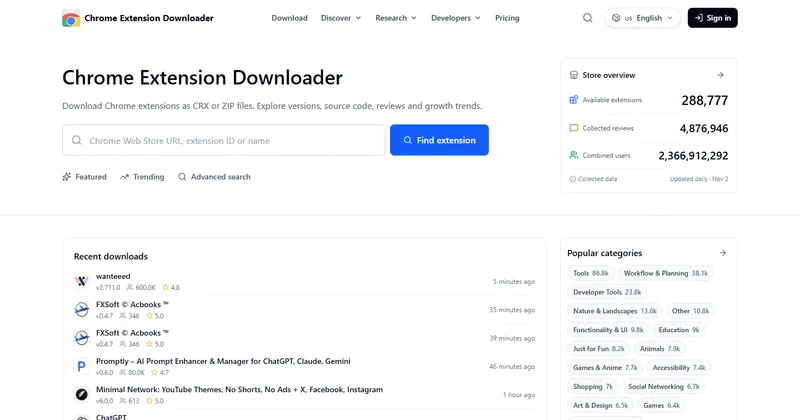
Chrome Extension Downloader is a website that lets you download Chrome Web Store extensions as CRX or ZIP files and research them. Besides the package, it shows version history, reviews, trends and permissions.
At the time of listing the home page showed 288,777 extensions and 4.9 million collected reviews, updated daily. The site says it is an independent service and not affiliated with Google or the Chrome Web Store.
How do I download an extension?
Enter a Chrome Web Store link, an extension ID or a name, then choose a version and download it as a CRX or a ZIP.
The current version has no age limit. Older versions are only available if the site captured them and they were updated within the last three calendar months. Removed extensions may still have detail pages, but the package may no longer be retrievable.
What can I research?
You can inspect source files and the manifest, read reviews and AI summaries, follow changes in users and ratings, check permissions and compare extensions.
- Source viewer, source search and a local CRX extractor
- Review analysis with strengths, drawbacks and AI summaries from a review sample
- User, rating and ranking history, plus trending and top-rated lists
- Permission analysis and security signals, which are heuristics and not malware scans
- Keyword research using third-party search data, competitor comparison and a copycat checker
How do the API and MCP access work?
The site offers a read-only REST API and an MCP endpoint that share one API key and account quota.
The MCP endpoint is at extensiondownloader.com/api/mcp and uses a bearer token. An optional research skill adds workflows for comparisons, reviews and permission checks, and the site says it works with tools such as Codex or Claude Code.
How does pricing work?
The Free plan costs nothing and needs no account. Pro is listed at 19 USD a month but shown as free for a limited time, and a Custom plan is agreed with the team.
Free covers downloads, source inspection and research. Pro adds favorites, saved searches, alerts, CSV and JSON exports and self-service API keys. Custom is for higher API and MCP quotas and bulk data. Check the pricing page for the current offer.
Alternatives to Chrome Extension Downloader
Extension tools differ in whether they give you the package, the data or both. Chrome Extension Downloader combines package downloads with source, review and trend research.
- Chrome Web StoreGoogle’s official store for installing Chrome extensions.chromewebstore.google.com ↗
- CRXcavatorA tool that scores the risk of browser extensions.crxcavator.io ↗
- Chrome-StatsA site with statistics and downloads for Chrome extensions.chrome-stats.com ↗
How Chrome Extension Downloader compares
| Option | Best for | Trade-off |
|---|---|---|
| Chrome Extension Downloader | Downloading a CRX or ZIP and researching an extension’s source, reviews and trends in one place | Older versions are limited, rankings are the site’s own, and security signals are not malware scans |
| Chrome Web Store | Installing an extension from its official listing | It does not offer a package download or trend and source research |
| CRXcavator | Risk review of extensions | Focused on risk scoring, so its data and features differ |
| Chrome-Stats | Extension statistics and history | Its features and limits differ, so compare them with your needs |
Chrome Extension Downloader is a fit when you need the extension package and want to inspect it and study its reviews and trends together. If you only want to install an extension, use the Chrome Web Store.
Questions people ask about Chrome Extension Downloader
What is Chrome Extension Downloader?
A website for downloading Chrome extensions as CRX or ZIP files and researching their source code, reviews, trends and permissions.
Is Chrome Extension Downloader free?
Yes, the Free plan needs no account and covers downloads and research. Pro is listed at 19 USD a month but shown as free for a limited time.
Can I download older versions?
Sometimes. Older versions need a captured download URL and an update within the last three calendar months. The current version has no age limit.
Can I download extensions for Firefox or Safari?
No. Files are Chrome Web Store packages. Other Chromium browsers may support them, but Firefox and Safari formats are not provided.
Are the security signals a malware scan?
No. The site says permission and safety indicators are heuristics, not malware scans.
Is there an API?
Yes. There is a read-only REST API and an MCP endpoint that share one key and one quota.
Is it affiliated with Google?
No. The site says it is an independent service, not affiliated with Google or the Chrome Web Store.
What are the alternatives to Chrome Extension Downloader?
The Chrome Web Store itself, CRXcavator and Chrome-Stats are other ways to find and assess extensions. They differ in data and features.