 Amplibee
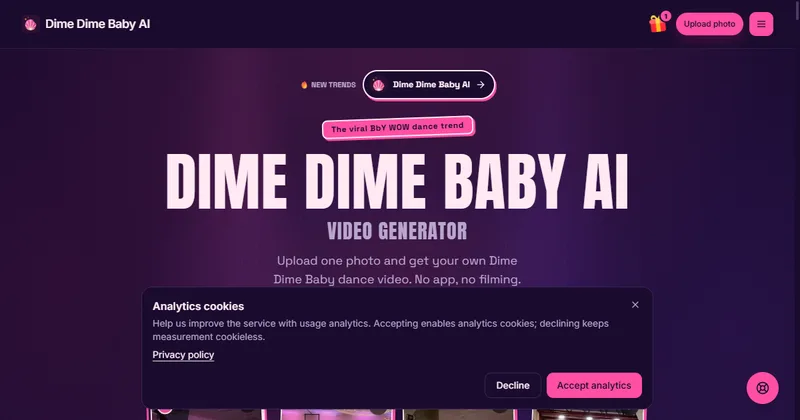
What is Dime Dime Baby AI?
Dime Dime Baby AI is a web tool that turns one photo into a short dance video in the style of the Dime Dime Baby trend linked to the song BbY WOW.
It pairs your photo with a built-in motion reference clip. The photo supplies the person or pet, and the chosen dance supplies the moves and camera. The result is a new AI interpretation, not footage from the original viral video.
There is no app to install and no filming. You do not upload a video.
Who is Dime Dime Baby AI for?
It is for anyone who wants a Dime Dime Baby dance video of themselves, an adult who agreed, or a pet.
Its rules do not allow photos of children, celebrities or public figures. The site says “Baby” in the trend name does not mean child photos are supported.
How does Dime Dime Baby AI work?
You upload one photo, choose a dance setting, check the credit quote, then generate and download the MP4.
You must confirm that you have permission to use the photo before generating. Each new generation is charged again, so the site asks you not to click Generate again just to check progress.
- Upload a photo: JPG, PNG or WebP, up to 10 MB, with one subject and the face and some of the body visible.
- Choose a dance setting: the setting decides the scene and background.
- Set options: the default is Standard, 480p, 5 seconds and 9:16 vertical. Changing the model, resolution or length can change credit use.
- Generate and review: check the face, hands and turns, then download the MP4.
What dance settings can I pick?
There are six dance settings.
- Party hall: pink lights and a clear floor for a walk-in and stare
- Garage groove: open space and even light for full-body steps
- Dance studio: a plain backdrop that keeps the face and movement easy to see
- Garden party: warm string lights for a relaxed entrance
- Neon floor: pink and blue lights around one dancer
- Pet party: simple pet movement
What does the video look and sound like?
You get a new vertical 9:16 MP4, 5 seconds at 480p by default, with supported lengths up to 15 seconds.
Every video requests new AI party sound. The site says it is not the BbY WOW recording and may come back quiet. The service does not supply the song, lyrics or an artist’s voice, so to use trend music you add it in your posting app.
The site says results are not frame-exact. Facial detail, motion, beat sync and hands can vary, and the bite part of the dance is hard to reproduce.
How much does Dime Dime Baby AI cost?
A single video costs $9.90, and credit packs start at $29. The site says no subscription is required.
Prices are in US dollars and the final amount is confirmed at checkout. The site says packs never expire. Subscription options also exist and renew until canceled.
- Single Meme: $9.90 for 1 video
- Starter Pack: $29 for 50 credits, up to 5 standard attempts
- Crew Pack: $99 for 350 credits, up to 35 attempts
- Studio Pack: $199 for 900 credits, up to 90 attempts
- Label Pack: $499 for 3,000 credits, up to 300 attempts
What happens to my photo, and what about refunds?
On submission your photo is uploaded to storage and sent to the AI provider the site uses, and a confirmed technical failure returns the credits.
The site says your photo is not used as a public example, but anyone with the media URL can access it. There is no fixed automatic deletion period, and closing the tab does not delete files. To request deletion, email support@dimedimebabyai.video.
A completed result you dislike does not automatically return credits. Cash refunds are handled under its refund policy.
Alternatives to Dime Dime Baby AI
Several AI tools can animate a still image. Dime Dime Baby AI is narrower: it is built for one dance trend and offers six ready-made settings.
- ViggleAn AI tool that animates a character from an image using motion templates or a reference video.viggle.ai ↗
- HedraAn AI video studio that creates talking and animated character videos from an image and a prompt.hedra.com ↗
How Dime Dime Baby AI compares
| Option | Best for | Trade-off |
|---|---|---|
| Dime Dime Baby AI | Making a Dime Dime Baby style dance video from one photo without editing skills | Focused on one trend, 480p by default, no trend song supplied, and results are not frame-exact |
| Viggle | Trying many different dances and motions on one character | A general tool, so you set up the dance yourself rather than using one ready-made trend |
| Hedra | Character videos with speech and prompt-based control | Not built around a single dance trend |
Dime Dime Baby AI is the quickest fit if you only want this one dance from a single photo and prefer to pay per video. If you want many different motions or more control, a general tool such as Viggle or Hedra may suit you better.
Questions people ask about Dime Dime Baby AI
What is Dime Dime Baby AI?
A web tool that turns one photo into a short dance video inspired by the Dime Dime Baby trend linked to BbY WOW.
Who is Dime Dime Baby AI for?
Anyone who wants a dance video of themselves, an adult who agreed, or a pet.
What photo do I need?
One JPG, PNG or WebP photo up to 10 MB, with one subject and the face and some of the body visible. Covered faces are not recommended.
Can I use a photo of someone else?
Only an adult who agreed. You must confirm you have permission, and celebrities and public figures are not supported.
Can I use a photo of a child?
No. The site says photos of children are not supported and it is not a baby-video maker.
Does it work for pets?
Yes. There is a Pet party setting for simple pet movement.
What does the video look like?
A vertical 9:16 MP4, 5 seconds at 480p by default, with lengths up to 15 seconds supported.
Does the video include the BbY WOW song?
No. It requests new AI party sound, which may be quiet. To use trend music, add it in your posting app.
How much does it cost?
A single video is $9.90, and packs run from $29 for 50 credits to $499 for 3,000 credits. Prices are in US dollars.
Is there a subscription?
No subscription is required. You can pay per video or buy a pack, and the site says packs never expire.
Do I get credits back if the video fails?
A confirmed technical failure returns the consumed credits. A finished result you dislike does not automatically return them.
What are the alternatives to Dime Dime Baby AI?
General AI video tools such as Viggle and Hedra can animate a character from an image. Dime Dime Baby AI is built around this one dance trend.