 Amplibee
What is EdgeVolume?
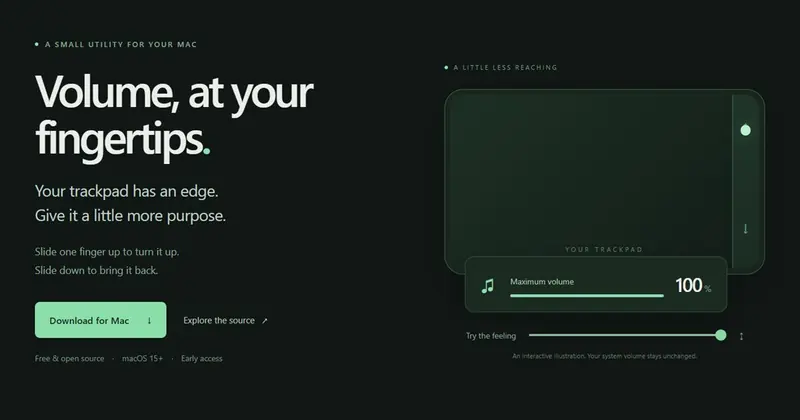
EdgeVolume is a free, open-source Mac app that turns the physical edge of your trackpad into a volume control.
Slide one finger up the edge to raise the output volume and down to lower it. It runs quietly in the menu bar while you work, so there is less reaching for the keyboard.
How does EdgeVolume work?
You pick an edge, enable gestures, then start one finger inside that edge and move vertically. Lift your finger to finish.
Gestures start paused on each launch, so you turn them on when you want them.
- Pick your edge: left, right or both, with the strip width and sensitivity that feel right.
- Slide to adjust: start inside the edge and move up or down.
- Keep working: close preferences and leave EdgeVolume running in the menu bar.
What are the features?
One-finger control, a choice of left, right or both edges, adjustable sensitivity and strip width, and an open-source codebase.
- One-finger volume control
- Left, right or both edges
- Adjustable sensitivity and strip width
- Lives in the menu bar
- Free, with the source on GitHub
How do I install EdgeVolume on a Mac?
Download the build for your Mac, drag EdgeVolume into Applications, open it and enable gestures.
Use the Apple Silicon build for M1, M2, M3, M4 and newer chips, and the Intel build for Intel-based Macs. To check, open the Apple menu, choose About This Mac, and look for “Chip” (Apple Silicon) or “Processor” (Intel). You need macOS 15 or newer. No Rust, Node.js or developer tools are needed.
The early-access app is not notarized, so macOS may block it the first time. After trying to open it, go to System Settings, then Privacy & Security, find the EdgeVolume notice and choose Open Anyway. Only do this for a download you trust.
Is EdgeVolume safe and what should I know first?
It is experimental. It uses a private macOS touch API to observe touch input, without suppressing cursor movement or macOS gestures.
Compatibility and gesture reliability still need testing across more trackpads. The code is public on GitHub, so you can read it before you run it, and newer fixes land in the source before the public downloads.
Does EdgeVolume work on Windows?
Not yet. Windows development builds offer audio test buttons and trackpad diagnostics, but physical edge gestures are still in development.
Alternatives to EdgeVolume
Most people change Mac volume with the keyboard or the menu bar. EdgeVolume adds a different gesture rather than replacing those.
- BetterTouchToolA paid Mac app for custom trackpad, mouse and keyboard actions. Release notes list edge-swipe gestures in recent versions.folivora.ai ↗
How EdgeVolume compares
| Option | Best for | Trade-off |
|---|---|---|
| EdgeVolume | People who like a quick one-finger slide on the trackpad and want a free, open-source option | Early access, experimental, macOS 15 or newer, and compatibility across trackpads is still being tested |
| Keyboard volume keys and the menu bar | Everyone, with nothing to install | Needs the keyboard or a trip to the menu bar, and there is no trackpad edge gesture |
| BetterTouchTool | People who want many custom gestures and automations, not just volume | Much larger than a single-purpose utility. It has a 45-day free trial, then needs a paid licence, and you set up the volume action yourself |
EdgeVolume is the lightweight choice if all you want is volume on the trackpad edge, and it is free and open source. If you already use a gesture tool such as BetterTouchTool, or you need a fully polished app today, that may suit you better.
Questions people ask about EdgeVolume
What is EdgeVolume?
A small, free, open-source Mac utility that lets you adjust your volume by sliding one finger along the physical edge of your trackpad.
How do I change the volume with EdgeVolume?
Enable gestures, start one finger inside the trackpad edge and move it up to raise the volume or down to lower it. Lift your finger to finish.
Is EdgeVolume free?
Yes. It is free and open source, with the code on GitHub.
Which Macs and macOS versions does EdgeVolume support?
macOS 15 or newer, on Apple Silicon (M1, M2, M3, M4 and newer) and on Intel-based Macs.
How do I know which Mac I have?
Open the Apple menu and choose About This Mac. A “Chip” line with an Apple M-series name means Apple Silicon. A “Processor” line with Intel means Intel.
What if macOS blocks EdgeVolume?
The early-access app is not notarized. After trying to open it, go to System Settings, then Privacy & Security, find the EdgeVolume notice and choose Open Anyway. Only do this for a download you trust.
Can I use the left or right edge, or both?
Yes. You can choose the left edge, the right edge or both, and set the strip width and sensitivity.
Does EdgeVolume work on Windows?
Not yet. Windows development builds have audio test buttons and trackpad diagnostics, but edge gestures are still in development.
Does it interfere with my cursor or other trackpad gestures?
It observes touch input without suppressing cursor movement or macOS gestures. It uses a private macOS touch API, so reliability still needs testing across more trackpads.
What are the alternatives to EdgeVolume?
The built-in macOS volume keys and menu bar control need nothing installed. BetterTouchTool is a paid app for custom trackpad, mouse and keyboard actions, with a 45-day free trial. EdgeVolume is the lightweight, free and open-source option for one gesture.
How does EdgeVolume compare with BetterTouchTool?
EdgeVolume does one thing, volume from the trackpad edge, and is free and open source. BetterTouchTool covers many gestures and automations but needs a paid licence after its trial, and you set up the volume action yourself.
Do I need developer tools to install it?
No. You do not need Rust, Node.js or any developer tools. Download, drag into Applications, open and enable gestures.