 Amplibee

What is ResumeInvited?
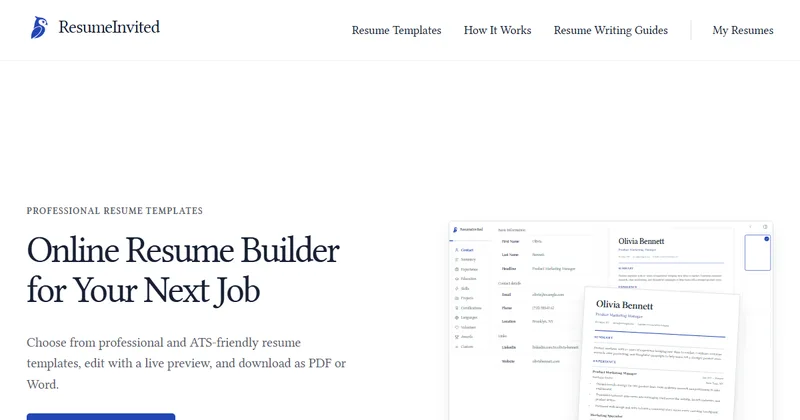
ResumeInvited is a website where you build a resume from a template, see a live preview as you type, and download it as a PDF or an editable Word file.
The home page calls the templates professional and ATS-friendly.
How does it work?
The site lists three steps: add your resume details, choose a template, then review and export.
- Fill in sections such as Contact, Summary, Experience, Education and Skills
- Pick one of five templates and adjust theme and typography
- Check the live preview
- Download a PDF, Word file or plain text
Can I download a Word file?
Yes. You can download an editable Word (DOCX) file, and the site advises checking the layout after you open it. PDF and TXT downloads are also offered.
The site says no print settings are needed for the PDF, and the TXT file is meant for copying into job application forms.
Where are my drafts saved?
Drafts are saved locally in your browser on your device, according to the site. Clearing browser data or using private browsing can remove a draft, so export a copy of important work.
Is ResumeInvited free?
The submission says the current version is free and needs no account. The site itself does not state pricing on its home page.
Alternatives to ResumeInvited
Many sites build resumes online. They differ in templates, export formats, price and whether you need an account.
- Resume.ioAn online resume builder with templates.resume.io ↗
- CanvaA design tool with resume templates.canva.com/resumes ↗
How ResumeInvited compares
| Option | Best for | Trade-off |
|---|---|---|
| ResumeInvited | Building a simple resume with a live preview and exporting a PDF or editable Word file | Five templates, drafts live only in your browser, and the site states no long-term pricing |
| Resume.io | A wide choice of templates and guided writing help | Check its site for current prices and download limits |
| Canva | Visually designed resumes | Design-heavy layouts may not suit applicant tracking systems |
ResumeInvited is a fit when you want a quick, plain resume with a live preview and a Word or PDF file at the end. Export a copy of your draft, because it is stored only in your browser.
Questions people ask about ResumeInvited
What is ResumeInvited?
An online resume builder with ATS-friendly templates, a live preview, and PDF or Word downloads.
Is it free?
The submission says the current version is free. The home page does not state pricing.
Do I need an account?
The submission says no account is needed in the current version. The site links a My Resumes page and does not say whether it needs sign-in.
How many templates are there?
Five: Classic Ruled, Centered Mono, ATS Split, Clean Slate and Business Pinstripe.
What formats can I download?
PDF, editable Word (DOCX) and plain text (TXT).
Are my drafts saved?
Yes, locally in your browser. Clearing browser data or using private browsing can remove them.
Who operates ResumeInvited?
The footer says it is operated by Big Red Rabbit LLC.
What are the alternatives to ResumeInvited?
Resume.io and Canva also offer online resume builders. ResumeInvited focuses on a live preview and PDF and Word downloads without sign-up in its current version.