 Amplibee
What is Everygen AI?
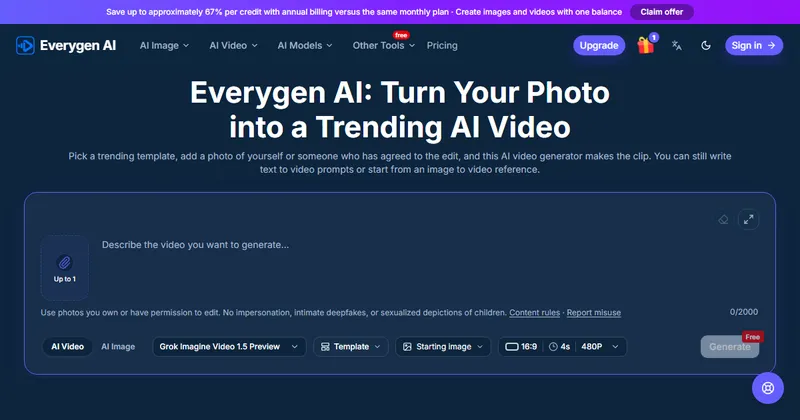
Everygen AI is a web service that makes AI videos and images from a photo, a text prompt or a reference image.
The headline feature is photo templates. A template sets the motion and the prompt, so you only add a photo. Most templates need one photo and a few need two.
It also offers text to video, image to video, image creation and image editing on the same credit balance.
Which models does it offer?
The site lists video and image models from several families, and you choose one before you generate.
Duration, resolution and aspect ratio can be changed before generating, and the credit cost updates to match.
- Video: Veo, Seedance, Kling, Wan, Grok Imagine, MiniMax and Gemini models
- Image: Seedream, Nano Banana and GPT Image models
How much does it cost?
It is paid. Generation uses credits, and the site lists four subscription plans plus a single-video purchase.
Annual billing is cheaper per credit and is paid upfront, with credits released monthly. Unused subscription credits do not roll over. Prices are in USD, so confirm the final amount at checkout.
- Basic: 180 credits a month for $20 a month
- Pro: 450 credits a month for $35 a month
- Studio: 1,200 credits a month for $60 a month
- Agency: 2,400 credits a month for $79 a month
- Single video: $6.99 for one saved video up to 720P and 15 seconds on eligible settings
What photos can I use?
Use photos you own or have permission to edit, ideally clear and well lit with an easy-to-see face.
The site prohibits impersonation, intimate deepfakes and sexualized depictions of children. Uploads and results are not added to public examples automatically, but files are delivered through links that anyone with the link can open, so avoid uploading confidential photos.
Can I download my videos?
Yes. You can preview a finished video or open the saved task to download it, and signed-in users can revisit their generation history.
Alternatives to Everygen AI
AI video tools range from single-model apps to services that put several models behind one account. Everygen AI leans on ready-made photo templates and a shared credit balance for video and images.
- RunwayAn AI video and image platform with its own generation models and editing tools.runwayml.com ↗
- PikaAn AI video generator known for short clips and effects.pika.art ↗
- Kling AIThe web app from the team behind the Kling video models.klingai.com ↗
How Everygen AI compares
| Option | Best for | Trade-off |
|---|---|---|
| Everygen AI | Making a quick, shareable clip from one photo with a template, or trying several video and image models on one credit balance | Credit-based pricing with no free generation, and results depend on the model and settings you choose |
| Runway | Creators who want a full AI video workflow and editing tools | Built around its own models and a more detailed workflow than one-photo templates |
| Pika | Quick, playful clips and effects from text or images | A narrower choice of underlying models |
| Kling AI | People who mainly want the Kling models directly | Focused on one model family instead of a mix |
Everygen AI is a fit if you want template-driven clips from a photo and the option to switch between models without separate accounts. If you want a deeper editing workflow or a single model family, one of the alternatives may suit you better. Check the credit quote before each generation.
Questions people ask about Everygen AI
What is Everygen AI?
A browser-based AI video and image generator that includes trending photo templates, text to video and image to video.
Do I need to write a prompt?
Not for templates. A template sets the motion and prompt, and you add one photo. Text to video takes a written scene of up to 2,000 characters.
Is Everygen AI free?
Browsing samples and preparing prompts are free, but generating uses credits. The generator shows the cost before you submit.
How much does it cost?
Subscription plans are $20, $35, $60 and $79 a month, and a single saved video costs $6.99, as listed on the site.
Do unused credits roll over?
The site says unused subscription credits do not roll over.
What happens if a generation fails?
Credits are returned for confirmed technical failures.
Are my uploads public?
Not automatically, but files are delivered through links that anyone with the link can open, so the site advises against sharing confidential photos.
What are the alternatives to Everygen AI?
Runway, Pika and Kling AI are well-known AI video tools. They differ in how much they rely on templates, which models they offer and how they charge.