 Amplibee

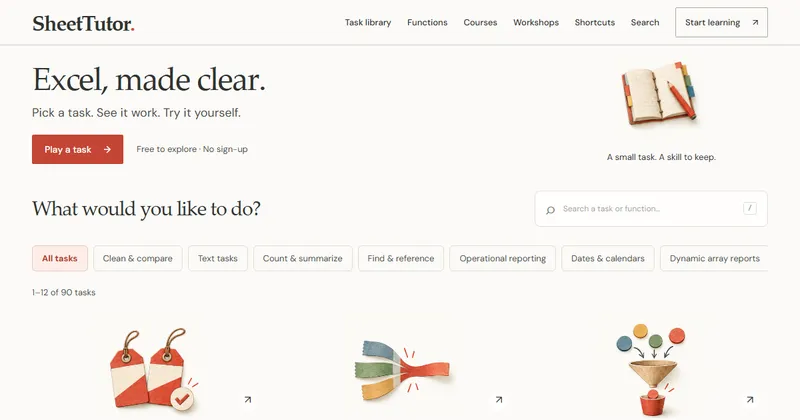
What is SheetTutor?
SheetTutor is a place to practise Excel formulas. You pick a small everyday task, see how the formula works, then try it yourself in a worksheet that calculates in your browser.
It describes itself as an independent learning resource that is not affiliated with Microsoft.
How does the practice work?
Each task shows the formula first, then walks through it in visual steps. When you are ready you switch to a “Your turn” worksheet and enter your own formula.
- The worksheet calculates supported formulas in your browser
- Your result is checked against an independent calculation on several datasets
- A different formula that gives the right answer can still pass
What can I learn?
The task library covers everyday jobs such as finding duplicates, summing with several conditions, lookups, cleaning imported text, dates and reporting.
- Tasks are grouped by topic and marked Starter or Growing, with a time estimate
- Function pages, formula examples and guides sit alongside the tasks
- Practice workbooks can be downloaded with the examples and answer sheets
What are the limits?
It is a learning worksheet, not the full Microsoft Excel application. Each task states its browser, Excel and Google Sheets verification status.
The site uses AI-assisted authoring for original examples and explanations, and runs structured checks on content and calculations. It says these checks help find errors but cannot guarantee that every explanation is correct.
Alternatives to SheetTutor
You can learn Excel formulas from reference sites, video lessons or by working in Excel itself. SheetTutor adds working worksheets with answer checks, so you can practise without a spreadsheet program or an account.
- ExceljetA site of Excel formula explanations, examples and training.exceljet.net ↗
- Microsoft Excel help and trainingMicrosoft’s own documentation and training for Excel.support.microsoft.com/excel ↗
How SheetTutor compares
| Option | Best for | Trade-off |
|---|---|---|
| SheetTutor | Practising formulas on small tasks and getting your answer checked, with no sign-up | It is a browser worksheet, not the full Excel application, and the content is in English only |
| Exceljet | Looking up how a formula works with clear examples | You practise in your own copy of Excel, so answers are not checked for you |
| Microsoft Excel help and training | Official guidance on every Excel feature | It is reference material rather than checked practice tasks |
SheetTutor is a fit when you want to practise formulas on small tasks and see right away whether your answer is correct. For full Excel features and official guidance, use Excel itself and Microsoft’s help.
Questions people ask about SheetTutor
What is SheetTutor?
A free Excel practice web app where you type formulas into browser worksheets and check your answers in guided tasks.
Is SheetTutor free?
Yes. The site says existing free lessons and exercises remain permanently free.
Do I need an account?
No. You can practise without signing up.
Do I need Excel installed?
No. The worksheets calculate in your browser. You can also download practice workbooks to use in a spreadsheet program.
Is my work saved or uploaded?
Worksheet input is processed locally in your browser and progress is stored on your device, so it does not follow you to another browser.
Does it work exactly like Excel?
Not in every detail. It is a learning worksheet, and each task states how far it has been verified in the browser, Excel and Google Sheets.
What language is it in?
English.
What are the alternatives to SheetTutor?
Exceljet and Microsoft’s own Excel help and training are common places to learn formulas. They differ in how much hands-on checking they offer.