 Amplibee

What is Device-Test?
Device-Test is a website where you can check that your microphone, camera, speakers, screen, keyboard and other hardware work, directly in the browser and without installing anything.
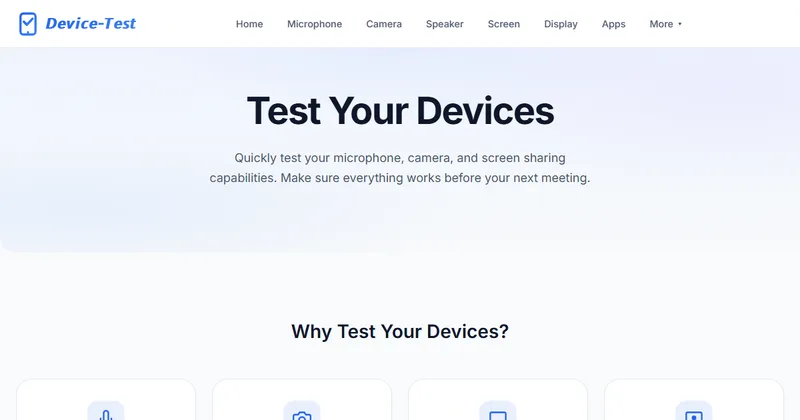
The home page headline is “Test Your Devices”. It describes quickly testing your microphone, camera and screen sharing so everything works before your next meeting.
Which devices can it test?
The site groups its tests into audio and video, input and display, and sensors.
The display test is described as a check for dead pixels, bright spots and backlight bleeding using solid colors.
- Audio and video: microphone, camera, speaker and screen
- Input and display: display, keyboard, touch, gamepad, MIDI and an input performance lab
- Sensors and more: network, battery, location, vibration, light sensor, gyroscope and Bluetooth
Is my data sent anywhere?
According to the site, no. It says all tests run locally in your browser, no data is sent to any server, and the site does not collect data.
The site also shows a cookie notice with Accept All, Reject All and Cookie Settings. The pricing page says the site is supported by advertising. Read the privacy page on the site for the full terms.
Do I need an account or a payment?
No. The pricing page says every browser device test is free, with no trial clock, account wall or paid tier, and that no payment details are requested for the web tests.
It also says no paid team plan is currently offered, and that teams can link directly to the public test pages.
When is it useful?
Before a video call, a presentation or a screen share, and when you are working out whether a problem is the hardware, the browser or the network.
- Check that the right microphone and camera are picked up before a meeting
- Look for dead pixels on a new monitor
- Check that every key on a keyboard registers
- Confirm a gamepad or MIDI device is detected
- Look at your network connection from the browser
Which languages does the site support?
The site lists 19 languages, including English, Simplified and Traditional Chinese, Spanish, French, German, Dutch, Italian, Japanese, Korean, Russian, Portuguese and Arabic.
Alternatives to Device-Test
Many sites test one device, such as a webcam or a keyboard. Device-Test groups many tests under one site, so you can move from the microphone to the display without changing sites.
- Webcam TestsA site for testing a webcam in the browser.webcamtests.com ↗
- Online Mic TestA site for testing a microphone in the browser.onlinemictest.com ↗
- Keyboard TesterA page for checking that keyboard keys register.keyboardtester.com ↗
- Gamepad TesterA page for checking that a game controller is detected.gamepad-tester.com ↗
How Device-Test compares
| Option | Best for | Trade-off |
|---|---|---|
| Device-Test | Checking several devices in one place before a meeting or when troubleshooting | The site does not state which browsers it supports or who operates it, and it is supported by advertising |
| Webcam Tests | Checking a camera only | Focused on webcams rather than a full set of devices |
| Online Mic Test | Checking a microphone only | Focused on microphones rather than a full set of devices |
| Keyboard Tester | Checking a keyboard only | Covers keyboards, not cameras, microphones or displays |
| Gamepad Tester | Checking a gamepad only | Covers controllers, not other hardware |
Device-Test is a fit when you want a quick check of several devices without installing software or signing up. If you only need one device and a deep test of it, a single-purpose tool may go further.
Questions people ask about Device-Test
What is Device-Test?
A free website with browser-based tests for your microphone, camera, speakers, screen, display, keyboard, gamepad, network and other hardware.
Is Device-Test free?
Yes. The pricing page lists $0 for the web version and says there is no trial clock, account wall or paid tier.
Do I need to install anything?
No. The tests run in the browser. The site also links to downloadable apps, but the browser tests do not need them.
Does it send my microphone or camera data to a server?
The site says all tests run locally in your browser and that no data is sent to any server.
Which browsers does it support?
The site does not state a supported browser list. Tests that use the microphone, camera or other sensors need you to allow access in your browser.
Can I test a keyboard or a gamepad?
Yes. The site lists keyboard, touch, gamepad and MIDI tests, and an input performance lab with click speed, scroll and reaction modes.
Who runs Device-Test?
The site does not say. The footer carries a 2026 rights notice in the name Device-Test and links to privacy, terms and support pages.
What are the alternatives to Device-Test?
Single-purpose test sites such as Webcam Tests, Online Mic Test, Keyboard Tester and Gamepad Tester each cover one kind of device. Device-Test puts many tests in one place.