 Amplibee

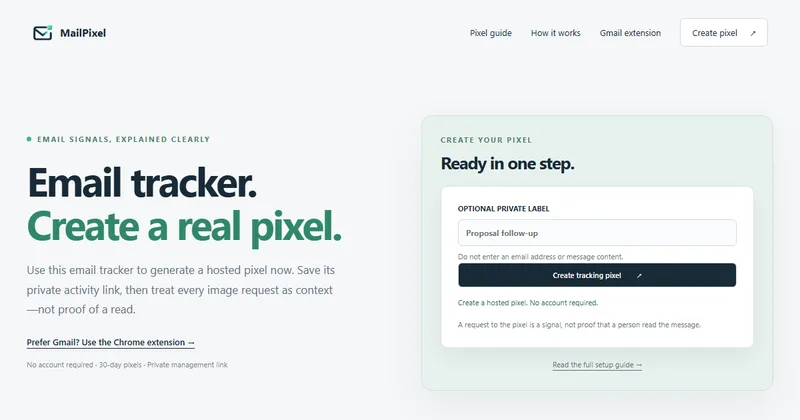
What does MailPixel do?
MailPixel creates a hosted tracking pixel, a small remote image you add to an HTML email, and records the requests made to it so you can see them in a private activity report.
According to the site, you get an HTML snippet and a pixel URL, and the report shows server timestamps on valid image requests. You can pause or delete a pixel from the report.
How do I create and use a pixel?
You optionally add a private label, create the pixel, save the private management link, then place the snippet or URL in a compatible HTML email.
- Create the pixel, with an optional label that should not contain an email address or message content
- Copy the HTML, the URL, or download the HTML
- Save the private link before leaving the page
- Insert the pixel in your email
- Open the activity report to view requests, pause or delete
Does an open request mean the email was read?
No. The site says a request is a signal, not proof that a person read the message, and that results are not verified identity, delivery, attention or agreement.
It says privacy features and automated image requests can create a signal without a human read, while blocked images can hide a real read. Proxies, caching and forwarding can also change what is recorded.
How long is data kept?
Pixels expire after 30 days, according to the site, and each pixel has a request cap that the site does not give a number for.
Private links are saved in your browser, so clearing browser data removes them. The site says the private link cannot be recovered if lost, and that anyone using the same browser profile can open and manage the pixel.
Does it work in Gmail?
Raw HTML does not work in normal Gmail compose. The site says to use Insert photo, then Web Address (URL), or to use its separate Chrome extension.
The site says the extension and the web tool are separate workflows and that activity is not automatically shared between them.
What should I keep in mind about privacy?
The site asks you not to enter an email address or message content in the label, and the submission asks you to respect applicable privacy rules and stop if a recipient opts out.
- Test with an inbox you control
- Use it alongside replies and explicit confirmation
- Avoid personal data in labels and snippets
- The site shows no mailbox connection
Alternatives to MailPixel
Email open tracking comes as free pixel generators, Gmail extensions and sales outreach platforms. They differ in setup, limits and price.
- MailtrackAn email tracking extension that shows when messages are opened.mailtrack.io ↗
- StreakA CRM that works inside Gmail and includes email tracking.streak.com ↗
- YeswareA sales email tool with tracking, templates and reports.yesware.com ↗
- HubSpot SalesEmail tracking inside HubSpot's sales tools.hubspot.com/products/sales/email-tracking ↗
How MailPixel compares
| Option | Best for | Trade-off |
|---|---|---|
| MailPixel | A quick, no-account hosted pixel for important one-off emails | Pixels expire after 30 days, and results are signals rather than proof of a read |
| Mailtrack | Gmail users who want tracking inside their inbox. | Requires an extension and a mailbox connection; free use adds a signature. |
| Streak | Teams that want tracking together with pipeline management. | More than you need if you only want to check one email. |
| Yesware | Sales teams that send many tracked emails. | Built for sales workflows and paid for ongoing use. |
| HubSpot Sales | Teams that already use HubSpot. | Needs a HubSpot account and setup. |
MailPixel suits an occasional important email where you want a quick signal without an account. If you send often from Gmail, an extension such as Mailtrack or MailPing may fit better, and sales teams may prefer Yesware. Whichever you use, treat an open as a hint, not proof of a read.
Questions people ask about MailPixel
What is MailPixel?
MailPixel is a free hosted email tracking pixel generator with a private activity report. According to the site, it needs no account.
Is MailPixel free?
The site says it is free and lists no paid plans.
Do I need an account?
No. The site says no account is required.
How long does a pixel last?
Pixels expire after 30 days, according to the site. They also have a request cap that the site does not state.
Is an open the same as a read?
No. The site calls a request a signal, not proof that a person read the message.
Can I use it in Gmail?
Yes, in a specific way. Use Insert photo with a web address, or the separate Chrome extension. Raw HTML in normal Gmail compose is not a supported workflow, according to the site.
What if I lose the private link?
The site says it cannot be recovered if lost, so copy it before leaving the page.
Can I delete a pixel?
Yes. The site says you can pause or delete a pixel from its activity report.