 Amplibee

What is the Sea Imagine AI Image to Video page?
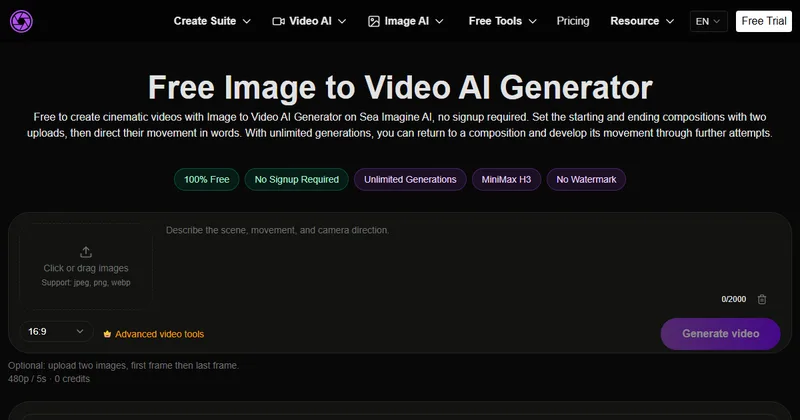
It is a free page that turns a starting image and an ending image, with a text prompt describing the motion, into a five-second 480p video.
How does it work?
You set the opening and closing compositions with two images, describe the change and pick an aspect ratio, then complete verification and generate.
You can also upload a single image. The page describes the two-image route as optional.
- Upload a first frame and a last frame
- Describe the motion and choose 16:9, 9:16 or 1:1
- Complete verification and generate
- Inspect the result
What does the output look like?
Every clip is 480p and 5 seconds. Changing the aspect ratio does not change those settings.
The page says free results are kept in the local history of your browser, so they do not follow you to another device.
Is it really free?
The page shows 0 credits and says no sign-up is needed. It says generations are unlimited, but you still wait in the free queue.
An optional paid workspace and a limited-time 20% off banner are shown, without prices on this page.
What else does the site offer?
The navigation lists a range of video and image tools and model pages, including MiniMax H3, Seedance, Kling and Nano Banana. The submission describes only this page.
Alternatives to Sea Imagine AI Image to Video
Image to video tools differ in clip length, resolution and whether the first and last frames can be set. This page lets you set both and guide the motion with text.
- DreaminaCapCut AI creative tool that makes video from text and from start and end frames.dreamina.capcut.com ↗
- GenApeAn AI video generator that lists start and end frame control on its free tier.genape.ai ↗
- ZSky AIAn AI keyframe video generator with a free first and last frame option.zsky.ai ↗
How Sea Imagine AI Image to Video compares
| Option | Best for | Trade-off |
|---|---|---|
| Sea Imagine AI Image to Video | Turning two stills into a short guided transition without signing up | Fixed 5 second 480p output, a free queue with verification, and results stored only in your browser |
| Dreamina | Trying start and end frame video with free daily credits | Free credits are limited and an account is needed |
| GenApe | Trying several video models with frame control | Free tier limits vary, so check its site |
| ZSky AI | Free keyframe video without a credit card | Each video uses credits and paid plans start at $19 a month |
A simple way to try a two-frame transition for free. If you need longer clips or higher resolution, look at its paid workspace and compare it with other tools.
Questions people ask about Sea Imagine AI Image to Video
What is Sea Imagine AI Image to Video?
A free page that turns a start image, an end image and a text prompt into a five-second 480p video.
Do I need to sign up?
No. The page says no sign-up is needed and shows 0 credits.
How long is the video?
5 seconds at 480p.
Which aspect ratios can I use?
16:9, 9:16 and 1:1.
Is there a watermark?
The page lists No Watermark among its badges.
Why is there a wait?
Free generations use a queue, and the page says waits vary. A verification step is also required.
Where are my results saved?
In your browser local history, not in a cross-device library, according to the page.
Is there a paid version?
Yes. The page links to a pricing page and an optional paid workspace. Prices are not shown on this page.