 Amplibee

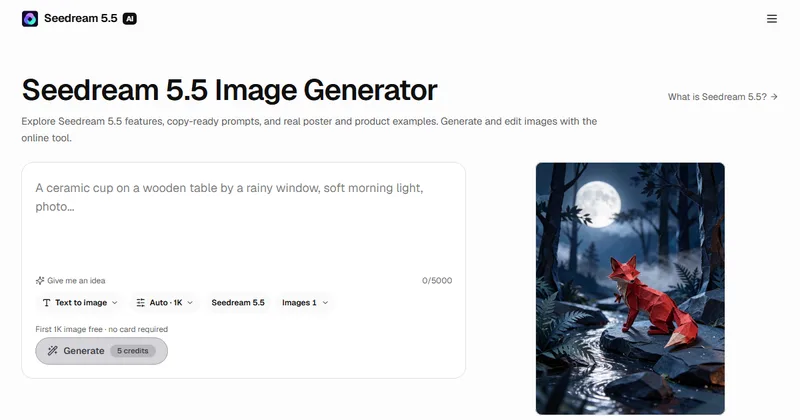
What is Seedream 5.5 AI?
Seedream 5.5 AI is an independent website for generating and editing images in a browser. It describes Seedream 5.5 as a ByteDance model for creating images from text and editing existing images.
The site says it has no affiliation with ByteDance or BytePlus, and that Seedream is a trademark of its owner.
What can I do with it?
You can generate images from a text prompt, edit images with reference photos, create transparent PNG assets and split an image into editable layers where supported.
- Up to 10 reference images per edit in the browser editor
- Resolutions of 1K, 1.5K and 2K
- Text-to-image and image editing API options
What are the prompt templates and examples?
The home page shows 16 examples. Select one to load its prompt and settings, then adapt it. Categories include travel and concert posters, product and food photography, portrait and outfit edits, interiors and storybook illustration.
More prompts are on a separate prompts page, according to the site.
How much does it cost?
A new account gets one first 1K image free, with no card required. After that, output costs 5 credits at 1K or 1.5K and 10 credits at 2K, plus 2 credits for each input image.
Studio is $8.25 a month with 1,000 credits and Scale is $33.25 a month with 5,000 credits. Subscriptions auto-renew, and unused monthly credits expire.
What should I check before publishing?
The site advises you to upload only images you have permission to edit, and to proofread text and check edges before publishing.
It also says publisher evaluation results are not guaranteed for every output.
Alternatives to Seedream 5.5 AI
Seedream models are available from several providers and apps. Seedream 5.5 AI is an independent browser site that pairs the generator with example prompts and guides.
- DreaminaThe official CapCut page for Seedream 5.5, which supports targeted edits and iterative refinement.dreamina.capcut.com ↗
- MidjourneyAn AI image generator listed as a Seedream alternative on AlternativeTo.midjourney.com ↗
- FLUXThe FLUX image models from Black Forest Labs, listed as a Seedream alternative.bfl.ai ↗
- Nano Banana ProGoogle's Gemini-based image generator and photo editor.gemini.google.com ↗
How Seedream 5.5 AI compares
| Option | Best for | Trade-off |
|---|---|---|
| Seedream 5.5 AI | Starting from a ready prompt example for a poster or product image, then adjusting it | Paid credits after the first free image, and it is independent of ByteDance |
| Dreamina | Using Seedream 5.5 from the model's own platform | Tied to the CapCut ecosystem and its own plans |
| Midjourney | A distinctive artistic look from a long-running image tool | Different prompting workflow and no Seedream model |
| FLUX | Text-to-image from an independent model family | Not the Seedream model, so results and prompts differ |
| Nano Banana Pro | Generating and editing images inside Gemini | Part of a general assistant rather than an image-only studio |
Seedream 5.5 AI is a good place to try the model, since the first 1K image is free and the prompt examples give you a starting point. Compare the credit cost with your own volume before you subscribe.
Questions people ask about Seedream 5.5 AI
What is Seedream 5.5 AI?
An independent website for generating and editing images with the Seedream 5.5 model.
Is it an official ByteDance service?
No. The site says it is not affiliated with or endorsed by ByteDance or BytePlus.
Is there a free trial?
Yes. Each new account gets one first 1K image, with no card required.
How many credits does an image cost?
5 credits at 1K or 1.5K and 10 credits at 2K, plus 2 credits per input image, according to the site.
What do the plans cost?
Studio is $8.25 a month for 1,000 credits and Scale is $33.25 a month for 5,000 credits. Yearly billing is $99.00 and $399.00.
Can I make transparent PNGs?
Yes. Select Transparent PNG in Advanced settings, according to the site.
How many reference images can I add to an edit?
Up to 10 in the browser editor, according to the site.
Do unused credits roll over?
No. Unused subscription credits expire at the end of each monthly period.