 Amplibee

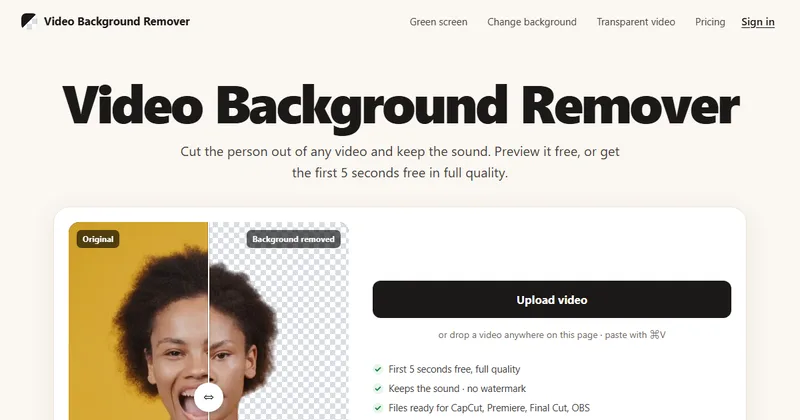
What is videobackgroundremover.ai?
It is a browser tool that removes the background from a video, keeps the person including hair and hands, and keeps the original audio.
The site presents it as an alternative to Unscreen and says it can also change backgrounds or remove green screens.
What is free?
You can preview the whole clip free with no sign-up. After signing in you can download the first 5 seconds in HD free once a day, with no watermark.
The preview is processed on your device, so the full clip is not uploaded just to view it.
What can I export?
A transparent video, a clip with a new background, or a cleaned green-screen clip, with formats chosen by the editing app you use.
- ProRes 4444 .mov for Premiere Pro, DaVinci Resolve and After Effects
- HEVC with alpha .mov for Final Cut Pro and iMovie
- WebM VP9 with alpha for OBS and websites
- MP4 with a new background for Canva
- Green-screen MP4 for CapCut on phones
How much does it cost?
You pay with one-time credit packs, and a download costs 2 credits per second of HD video at up to 30 fps. There is no monthly plan.
A 30 second clip costs 60 credits and a 1 minute clip costs 120. The first-order prices apply to the 240 and 960 packs for an email with no previous purchase.
- Pack 240: $9.90 ($7.99 first order)
- Pack 960: $29.90 ($22.90 first order)
- Pack 3000: $79.90
- Pack 9000: $199.90
What happens to my files?
HD processing runs on the servers only when you download, and usually only the part you download is uploaded. Finished files are deleted after 7 days.
The site says videos are never used to train any model.
Alternatives to videobackgroundremover.ai
Video background tools differ in output formats, length limits and how they charge. This one lets you preview the full clip free and pays per second only at download.
- VEEDAn online video editor with a video background remover.veed.io ↗
- CapCutA video editor whose free version has an AI background remover.capcut.com ↗
- KapwingAn online video editor with an AI background remover that needs no green screen.kapwing.com ↗
- CanvaA design tool whose video background remover is part of Canva Pro.canva.com ↗
How videobackgroundremover.ai compares
| Option | Best for | Trade-off |
|---|---|---|
| videobackgroundremover.ai | Getting a clean cutout or transparent clip for an editor, and checking the result before paying | Person cutouts only, a 1080p cap, 5 minute and 500 MB limits, and a free HD download of just 5 seconds a day |
| VEED | Editing and background removal in one place | A full editor, so heavier than a single-purpose tool |
| CapCut | Swapping in colors, images or video backgrounds | Background removal sits inside a larger editor |
| Kapwing | Isolating a person inside a browser editor | Part of a wider editor, so check its plans for limits |
| Canva | Teams already designing in Canva | The video background remover needs a Pro subscription |
The free preview makes it easy to see if the cutout works on your footage before you spend credits. Check edges on hair and fast motion in the preview first.
Questions people ask about videobackgroundremover.ai
What is videobackgroundremover.ai?
A browser tool that cuts the person out of a video, keeps the sound and exports transparent, new-background or green-screen files.
Is there a free option?
Yes. Preview the whole clip free, and download the first 5 seconds in HD once a day after signing in.
Is there a watermark?
No, according to the site.
How long and large can a video be?
Up to 5 minutes and 500 MB, with a maximum output of 1080p.
Does it keep the sound?
Yes. The original audio is kept.
How much do credits cost?
Packs run from $9.90 for 240 credits to $199.90 for 9,000. A download costs 2 credits per HD second at up to 30 fps.
Do credits expire?
No. The site says they never expire and there is no subscription.
Are my videos used for training?
No. The site says videos are never used to train any model.